How to convert an image-only or scanned PDF into EPUB
Convert a permitted scan with EPUBTurn and compare selectable words, fractions and picture captions with the actual source.
On this page
1. Keep an unchanged copy of the scan
Use a scanned PDF you are permitted to upload and keep the original pages for checking. EPUBTurn is useful to try when a page image is too small to read comfortably and you want a reading copy with adjustable text.
Before uploading, inspect whether the page is upright and whether words near the spine or bottom edge are visible. Record one short passage, a name or number, and an important picture caption. For a cookbook, include a fraction and its ingredient; a correct number beside the wrong ingredient is still a reading problem.
A scanned page may already have an imperfect copied-text layer, as our cookbook source does. An image-only page has no selectable words. Check the printed scan in either case; the cookbook result is evidence for that actual scan, not a separate image-only benchmark.
2. Upload the scanned PDF
Open the EPUBTurn homepage and go to the PDF upload. Click Choose a PDF, select the scan and check the filename. Read the current file limits before continuing.
If the page image is sideways, prepare a corrected source copy first and keep the unchanged original separately. The actual sample below used upright published pages. No automatic rotation repair was tested, and no cleaner replacement scan was used to improve the result.
3. Create a free sample and inspect the selected pages
Click Create free sample. The service automatically selects up to ten pages. Check the included source pages when the sample is ready; automatic selection may leave out the difficult photograph, damaged paragraph or recipe continuation you intended to examine.
Compare only the pages actually included. Our separate nine-page cookbook input produced a sample of pages 2–4, while the focused three-page recipe input included all three. Those selections answer different questions and should not become one whole-book claim.

4. Prepare and save the sample EPUB
Choose Create sample download if that control is shown. Wait for Download sample EPUB, then save the actual file. Do not judge recognised text only from an on-page preview.
If the sample cannot be prepared, read the reported result before deciding what to change. Keep a record of the source pages you checked; switching to a different scan without noting the change makes a comparison harder to repeat.
5. Open the book and compare words with the scan
Import the saved EPUB into a reader. Apple Books on Mac supports many EPUB books through File > Import. Enlarge the text, select a sentence and read the complete passage beside its printed source.
Check names, punctuation, fractions and units. Then compare the photograph and its caption. Recognition can produce readable paragraphs while leaving a running header in the middle of a sentence. A comfortable font size does not establish that every word is correct.

What the saved sample shows
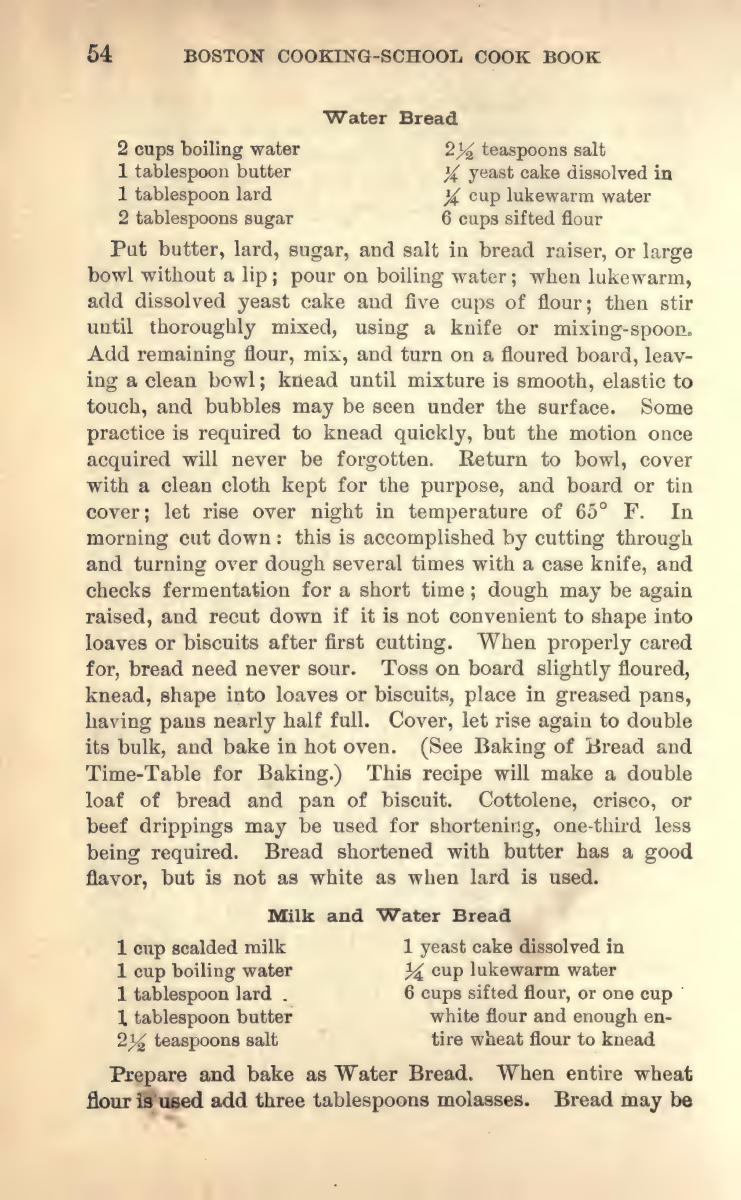
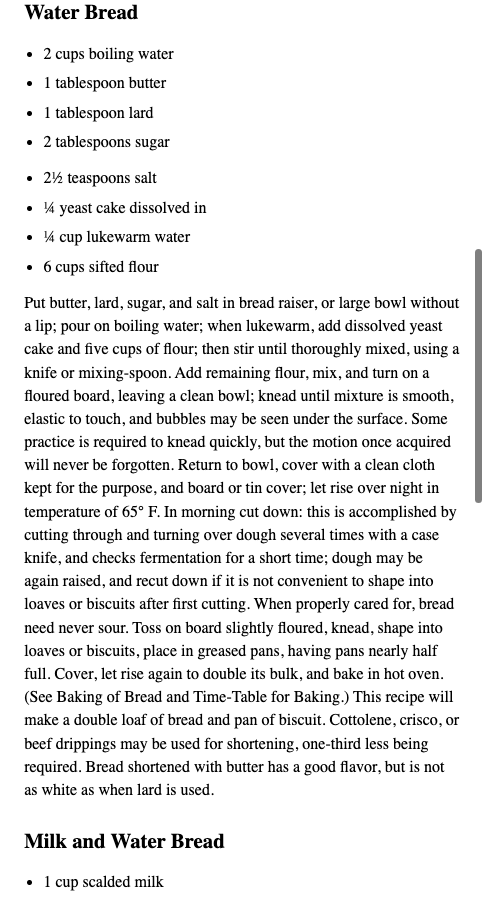
The actual three-page Farmer cookbook sample was downloaded through EPUBTurn’s normal workflow without manual text or image corrections. It retains two photographs and their captions, plus Water Bread’s eight ingredient entries and instructions. The inspected 2½ and ¼ fractions remain selectable text.
The Milk and Water Bread continuation is interrupted by a source-page header, and the chapter label remains generic. The separate measuring-page sample preserves six measurement relationships as a selectable list, not a structured table. Neither sample proves that the full cookbook converted successfully.
Open the same three-page scan and download the unchanged recipe sample to inspect those observations.
The source is Fannie Merritt Farmer’s public-domain 1917 cookbook, original PDF pages 42, 86 and 87. Keep preparation separate from recognition: the PDF readiness check helps you record whether a difficult word was already unclear in the scan.
Source scan
Unchanged EPUBTurn sample
6. Confirm the next conversion before spending credits
If full conversion is offered, follow the displayed sign-in and credit steps. Confirm the required pages and the current amount before approving conversion or payment. We did not perform a paid whole-cookbook conversion for this guide.
Proceed when the recognised passages help your reading task and the remaining defects are acceptable. Keep the original for exact quantities and check newly included pages after the full download. For a scan with unreadable source text, another conversion cannot establish words the source itself does not show.
Files used in this guide
Download the source files, conversion results or worksheets referenced here. Each label identifies the source document or the converter used.
Actual three-page cookbook scanUnchanged EPUBTurn recipe and photo sampleSeparate selected measuring-page sampleSources and further reading
Related guides
- Find the cause of garbled EPUB text with a three-way check
- Multilingual PDF conversion: check names, accents and order
- EPUB ligatures: check search and copied text before changing letters
- Correct scanned-page rotation before OCR and conversion
- Choose OCR languages and catch recognition mistakes
- OCRmyPDF and Calibre for scanned-document reading
- How to convert magazines into EPUB with EPUBTurn
- How to read a research paper as EPUB with EPUBTurn
- How to turn a textbook chapter into an EPUB reading copy
- How to convert annual reports into EPUB with EPUBTurn
- How to convert instruction manuals into EPUB with EPUBTurn
- How to convert lecture notes into EPUB with EPUBTurn
- How to convert recipe PDFs into EPUB with EPUBTurn