How to convert instruction manuals into EPUB with EPUBTurn
Follow a manual’s instructions and labelled diagrams. Follow the upload, sample and reader checks before deciding whether to convert more pages.
On this page
- Start with the reading task
- 1. Choose an authorised PDF and keep the original
- 2. Upload your PDF with Choose a PDF
- 3. Create a free sample and check selected pages
- 4. Prepare the sample download
- 5. Download the EPUB and inspect it in your reader
- Keep commands and code intact in a documentation reading copy
- 6. Decide whether to convert more pages
- What the actual example establishes
Start with the reading task
EPUBTurn turns eligible PDFs into EPUB reading copies. This guide shows how to test an instruction manual through the displayed sample controls. Open the PDF upload page when your document is ready. Keep the source as the reference for the details described below.
2. Upload your PDF with Choose a PDF
Go to the EPUBTurn upload screen and use Choose a PDF to select the manual. Confirm the displayed file is the intended revision. The current workflow accepts eligible PDFs up to 200 MB and full conversions up to 100 pages. A large service manual may be outside those limits. Keep the original available for schematics, measurements and safety instructions instead of treating an EPUB as a replacement for the manufacturer’s document.
3. Create a free sample and check selected pages
Use Create free sample when the upload is accepted. Up to ten pages are selected automatically, so inspect the selection before deciding whether the procedure you need was included. A sample containing a diagram but omitting its warning cannot establish that the complete instruction reads correctly. Follow the selected procedure from its heading to the last action and compare any cross-reference with the corresponding PDF page.

4. Prepare the sample download
After processing, select Create sample download if that control is shown. Wait for the resulting download control rather than assuming the preparation screen is the final reading file. Follow any review or error message on the actual screen. Do not fill a missing diagram or instruction from memory. If a required passage cannot be checked in the sample, record the gap and keep using the authoritative manual for that task.
5. Download the EPUB and inspect it in your reader
Choose Download sample EPUB, save the file and open it in your reader. Apple Books on Mac can import an EPUB through File > Import. Check whether each labelled component remains identifiable and whether the warning stays with the action it qualifies. Read numbered functions in their intended order at a larger font size. For Kindle, use an appropriate Send to Kindle route rather than assuming a raw EPUB copied by USB will open.

Keep commands and code intact in a documentation reading copy
Software documentation adds a requirement beyond ordinary instructions: a space, quote mark or line break can change a command. Check whether the publisher already offers EPUB or a documentation site before converting a PDF. A native reading edition may preserve code and links better than a conversion from printed pages.
If PDF is the available edition, keep its software version and choose an authorised section containing a command, its explanation and any related diagram. Use EPUBTurn’s free sample and compare a complete command character by character. Check straight quotes, hyphens, indentation and wrapped lines. Do not copy a command from the EPUB into a terminal merely because the paragraph is readable.
Download the sample, enlarge the text and check where long code lines wrap. Try one internal section link and one external documentation link. A figure should remain associated with the procedure it explains. Our actual NASA output preserves selected hardware drawings and prose, but contains no tested software code block; no code-preservation result is claimed. Use the EPUB for reading explanations when the sample suits that task, and retain the original documentation for commands you need to execute.
6. Decide whether to convert more pages
Proceed to full conversion only if the screen offers the option and the sample supports your reading task. Sign in if requested and review the actual credit confirmation before continuing. Keep the PDF for precise diagrams and safety-critical instructions. A more comfortable reading layout does not certify the manual, the equipment or the safety of following a converted instruction.
What the actual example establishes
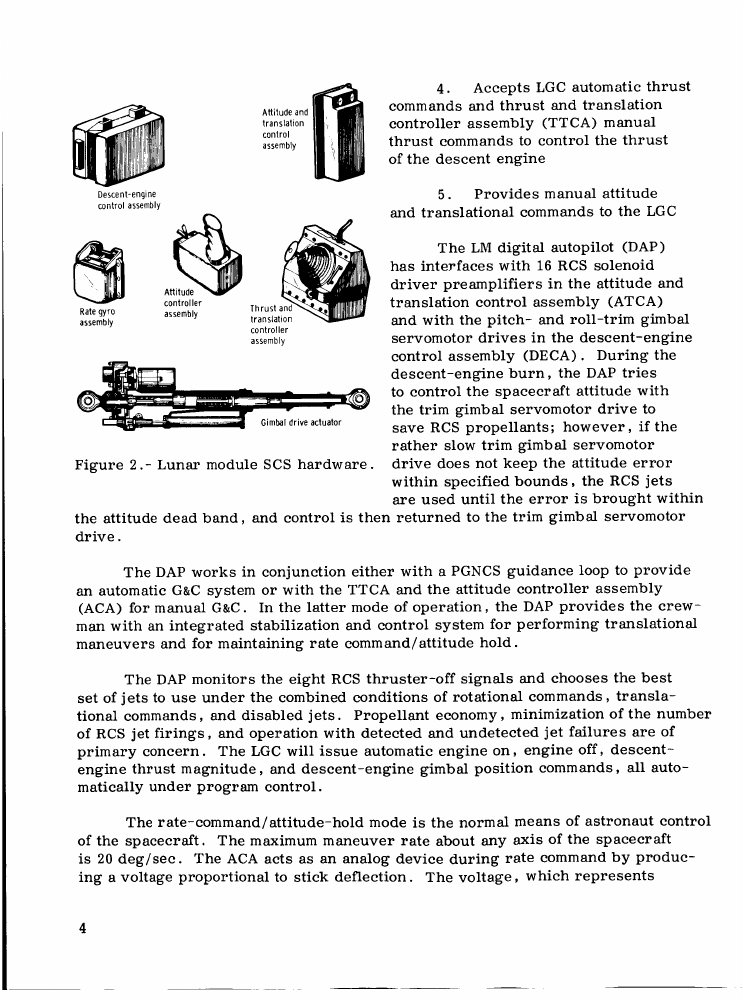
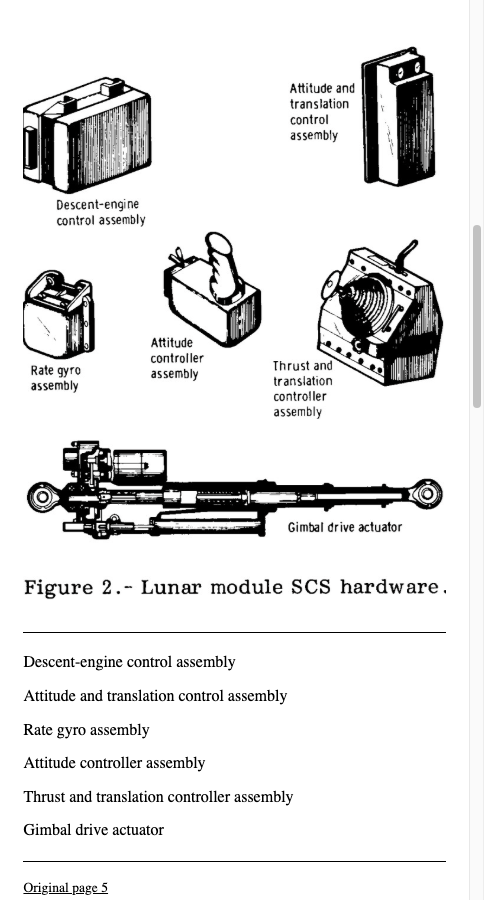
The actual NASA example uses six unchanged pages from a 1975 guidance-and-control report. Its normal EPUBTurn sample automatically included excerpt pages 4–6, corresponding to original PDF pages 6–8. Figure 2 retains six hardware drawings, labels and its caption. Abort Mode functions 1–5 remain in the text, although functions 1–4 are displayed as bullets and function 5 follows a page boundary as a paragraph. The earlier Figure 1 and opening pages were not selected. The result supports a narrow technical-reading check, not a claim that a complete modern manual or safety procedure was validated.
Source PDF
EPUBTurn sample
Files used in this guide
Download the source files, conversion results or worksheets referenced here. Each label identifies the source document or the converter used.
Actual six-page NASA source excerptActual three-page NASA EPUBTurn sampleSources and further reading
Related guides
- How to convert magazines into EPUB with EPUBTurn
- How to convert an illustrated novel into EPUB
- How to convert annual reports into EPUB with EPUBTurn
- How to convert a PDF newsletter into EPUB
- How to convert recipe PDFs into EPUB with EPUBTurn
- When EPUB reflow changes the meaning of poetry
- Comics and manga: when to keep fixed pages
- Illustrated PDF to EPUB: actual diagrams, charts and reading results
- How to convert an image-only or scanned PDF into EPUB
- How to read a research paper as EPUB with EPUBTurn
- How to turn a textbook chapter into an EPUB reading copy
- How to convert lecture notes into EPUB with EPUBTurn