How to convert an illustrated novel into EPUB
Try an illustrated novel PDF with EPUBTurn and inspect whether pictures remain with the correct scene and surrounding prose.
On this page
- 1. Find a scene whose picture matters to the story
- 2. Choose the prepared PDF in EPUBTurn
- 3. Create a sample and check its actual pages
- 4. Prepare the sample EPUB download
- 5. Read the selected passage beside its source
- What the actual example establishes
- Check the boundary between two stories in an anthology
- 6. Confirm whether a longer conversion is useful
1. Find a scene whose picture matters to the story
Keep an authorised PDF edition and identify a scene illustration rather than judging the result by a cover. Record the prose immediately before and after the picture. A picture can survive in the file yet appear at the wrong moment in the story.
EPUBTurn creates an EPUB reading copy from an eligible PDF. Open the PDF upload after preparing the source. Keep both files so the original remains available for exact layouts and citations.
2. Choose the prepared PDF in EPUBTurn
Select Choose a PDF and choose your illustrated novel PDF. Confirm the filename and displayed document. Read any current upload message before continuing. Eligible PDFs must fit the service’s limits: up to 200 MB, with full conversions up to 100 pages. A smaller authorised excerpt can be useful, but changing the filename does not change the document’s format or page count.
3. Create a sample and check its actual pages
Select Create free sample. Up to ten pages are selected automatically. Check the included page numbers against the passage you intended to inspect. For an illustrated novel PDF, an easy introductory page cannot answer a difficult layout question elsewhere. If the required continuation or figure is missing, leave that feature unchecked instead of treating the sample as a complete-document result.

4. Prepare the sample EPUB download
Use Create sample download when the result offers the control. Wait for the prepared book rather than deciding picture placement from an isolated preview. Read any message requiring attention before continuing. If the illustrated scene was not selected, the download cannot establish its pacing. Keep that scene unchecked and retain the original edition while inspecting the passages that do appear.
5. Read the selected passage beside its source
Choose Download sample EPUB and save the file. Open it in your reader; Apple Books on Mac supports File > Import.
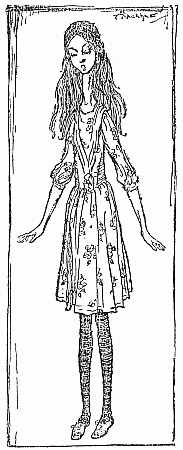
Read the prose immediately before the scene illustration, inspect the picture and continue with the following paragraph. Increase the font size and check the sequence again. Reflow can change the screen position without changing the story, so judge placement by surrounding prose rather than matching a printed page. A decorative ornament may tolerate different placement; a scene revealing a character or event may not. Keep the original for illustrated spreads whose composition is part of the experience. The published Rackham illustration below helps identify a scene-placement task; its presence is not evidence that an Alice PDF was converted successfully.

What the actual example establishes
The Rackham illustration above belongs to a published Alice edition and shows the scene-placement question. The linked book is a source example, not a successful EPUBTurn novel result. For your own authorised PDF, inspect the same surrounding prose after conversion. A retained technical illustration in our separate NASA sample does not establish story pacing or novel conversion quality.
Check the boundary between two stories in an anthology
An anthology needs clear story boundaries even when its pages have few illustrations. Choose an authorised PDF and record the title and author of two neighbouring stories. Include the first story’s ending and the second story’s opening when preparing a permitted excerpt outside EPUBTurn.
Create the free sample and check the selected pages. If a story boundary is covered, make sure the last sentence remains with the first story and the new title and author stay together. A repeated book title at the top of a page should not become another story. Where two stories restart chapter numbering, compare the EPUB’s headings with the source rather than assuming the repeated numbers indicate one continuous novel.
Download the sample and use the reader’s contents view to find a story. Try returning to that entry after changing the text size. Keep an illustration beside the passage it belongs to when the source includes pictures. No successful anthology conversion is claimed by the report and recipe evidence on this site. Assess the actual story ending, opening and navigation in your own sample before relying on the EPUB for the complete collection.
6. Confirm whether a longer conversion is useful
For an offered full conversion, check the displayed credit requirement before confirming. Continue when the sampled scene reads in the intended sequence and its illustration remains useful. Inspect another illustrated chapter in the longer book. Keep the PDF when artistic composition, detailed maps or full-page spreads are central to your reading.
Sources and further reading
Related guides
- How to convert magazines into EPUB with EPUBTurn
- How to convert annual reports into EPUB with EPUBTurn
- How to convert instruction manuals into EPUB with EPUBTurn
- How to convert a PDF newsletter into EPUB
- How to convert recipe PDFs into EPUB with EPUBTurn
- When EPUB reflow changes the meaning of poetry
- Comics and manga: when to keep fixed pages
- Illustrated PDF to EPUB: actual diagrams, charts and reading results