Choose OCR languages and catch recognition mistakes
OCR can confuse accented words, names and similar-looking characters. Choose the appropriate installed recognition languages and compare important words and numbers with the scan.
On this page
Choose languages from the actual document
- Identify the languages actually used in the document.
- Choose supported OCR languages in the recognition tool.
- Compare names and numerical passages with the scan.
- Correct representative errors before trusting the full text.
Set the recognition language in the OCR tool
OCRmyPDF’s language option can specify multiple installed languages. A documented example is --language eng+fra for English and French. The required language packs must actually be installed; naming a language is not the same as providing its recognition data. Check the current tool documentation before running the command on a saved copy.
Make an error list for the content you care about. Names, dates, minus signs and accented words deserve more attention than a paragraph’s general appearance. A dictionary-shaped word can still be the wrong word, especially with names or technical terms. If the document changes language between sections, inspect examples from each section. Do not assume a language setting translates the source or gives the conversion service a language-control feature that the upload interface does not offer.
Compare fractions with the printed recipe
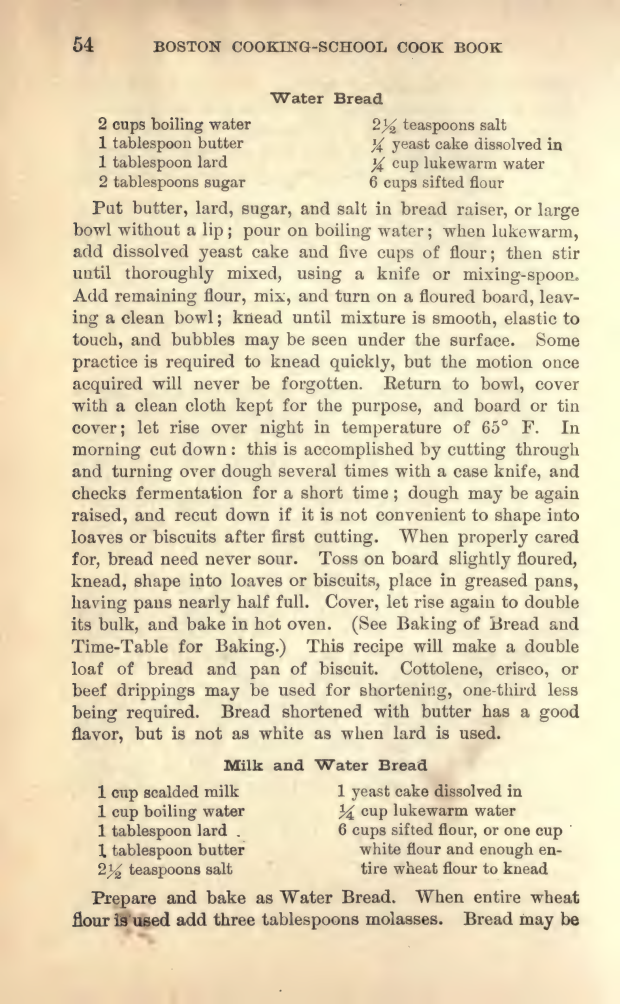
The Water Bread page in the 1917 cookbook shows 2½ teaspoons of salt and ¼ yeast cake dissolved in ¼ cup of lukewarm water. Its existing copied text already misreads fractions before conversion. Compare the printed marks with copied source text, then with the EPUB. Choosing English recognition does not guarantee that a fraction survives. Keep historical spelling and quantities visible in your record; do not claim a new converter error when the same error already exists in the source text layer.
Recognition is not translation
A language setting does not guarantee accurate translation or recognition. EPUBTurn is a conversion service, not a promise of user-selectable OCR engines or language controls. If exact quotations or figures matter, check against the PDF.
Make recognition checks content-specific
Different errors matter in different documents. For a historical article, a misspelled place name can make search ineffective. For a recipe, a changed quantity can change the instructions. For a technical passage, a lost minus sign can change the meaning. Choose representative strings based on the reading task rather than checking only common words.
Inspect punctuation and spacing as well. A missing apostrophe may be a minor nuisance in casual prose, while lost decimal punctuation can alter a figure. Record repeated error patterns, because a pattern may indicate a recognition issue that deserves a broader review rather than one isolated correction.
If the scan itself is unclear, retain uncertainty. Do not confidently replace an ambiguous name with the nearest familiar word. Compare another source edition if you are authorised to use it, or keep a note that the source is hard to read. Recognition software and conversion cannot establish the intended wording of a genuinely ambiguous source without additional evidence.
Compare printed fractions with the actual reading copy
The cookbook’s copied PDF text already misreads fractions, but the actual EPUBTurn sample retains Water Bread’s 2½ teaspoons salt and ¼ yeast cake dissolved in ¼ cup of water. Compare those particular printed marks and their ingredient names in the source and sample. The observed English page does not establish another language’s recognition or translation. Use a passage containing your actual accents, names and units when trying your document.
Open the actual source PDF · Download the saved EPUBTurn sample.
For your own document, create an EPUBTurn sample from your PDF, then use the reading checks described here.
Files used in this guide
Download the source files, conversion results or worksheets referenced here. Each label identifies the source document or the converter used.
Actual 1917cookbook source excerptSources and further reading
Related guides
- Find the cause of garbled EPUB text with a three-way check
- How to convert an image-only or scanned PDF into EPUB
- Multilingual PDF conversion: check names, accents and order
- EPUB ligatures: check search and copied text before changing letters
- Correct scanned-page rotation before OCR and conversion
- OCRmyPDF and Calibre for scanned-document reading