Convert PDF to EPUB with Calibre: a practical starting point
Calibre is worth trying when you want to convert a PDF on your computer and are comfortable checking the result. Start with a simple conversion, read the output and change a setting only when you can name the problem. If a complex magazine still has mixed columns or detached pictures, EPUBTurn offers another approach: create a sample from the original PDF and compare the reading flow before converting the whole file.
On this page
- Keep the original and choose a useful passage
- Make a baseline conversion
- What Calibre did with the published paper
- If every printed line becomes a new line
- If the columns still read in the wrong order
- If headers or pictures interrupt the article
- Choose the result you would actually read
- Source and licence
- Compare the same passage before changing tools
- NASA source
Keep the original and choose a useful passage
Save an unchanged copy of your PDF before starting. Pick a passage with a beginning and an end that you can recognise in the result. A complete paragraph crossing a printed line or page boundary is more useful than a cover page.
For an illustrated article, include a figure and the sentence that introduces it in your inspection. For a report, choose a heading followed by several paragraphs. You are trying to find out whether the reading structure survives, not just whether a new file appears in a folder.
Check whether you can select a short sentence in the PDF. A scan consisting of page images needs text recognition before ordinary text conversion can work well. A blurry scan also needs a careful accuracy check; changing its file extension will not create readable words.
EPUBTurn offers a sample reading edition for PDFs you are allowed to upload; keep the original available for checking.
Make a baseline conversion
In Calibre, add the PDF to your library, select the book and open Convert books. Choose EPUB as the output format. Check the title and author, then run the conversion before making several changes at once. Calibre’s conversion manual explains the available controls.
Open the EPUB and compare your chosen passage with the source. Keep notes that describe the visible problem: “the second column interrupts the first paragraph” is useful; “the formatting looks wrong” is much harder to act on.
Give each attempt a recognisable filename when saving it outside the library. Keeping the baseline makes it easier to see whether a change genuinely improved the result.
What Calibre did with the published paper
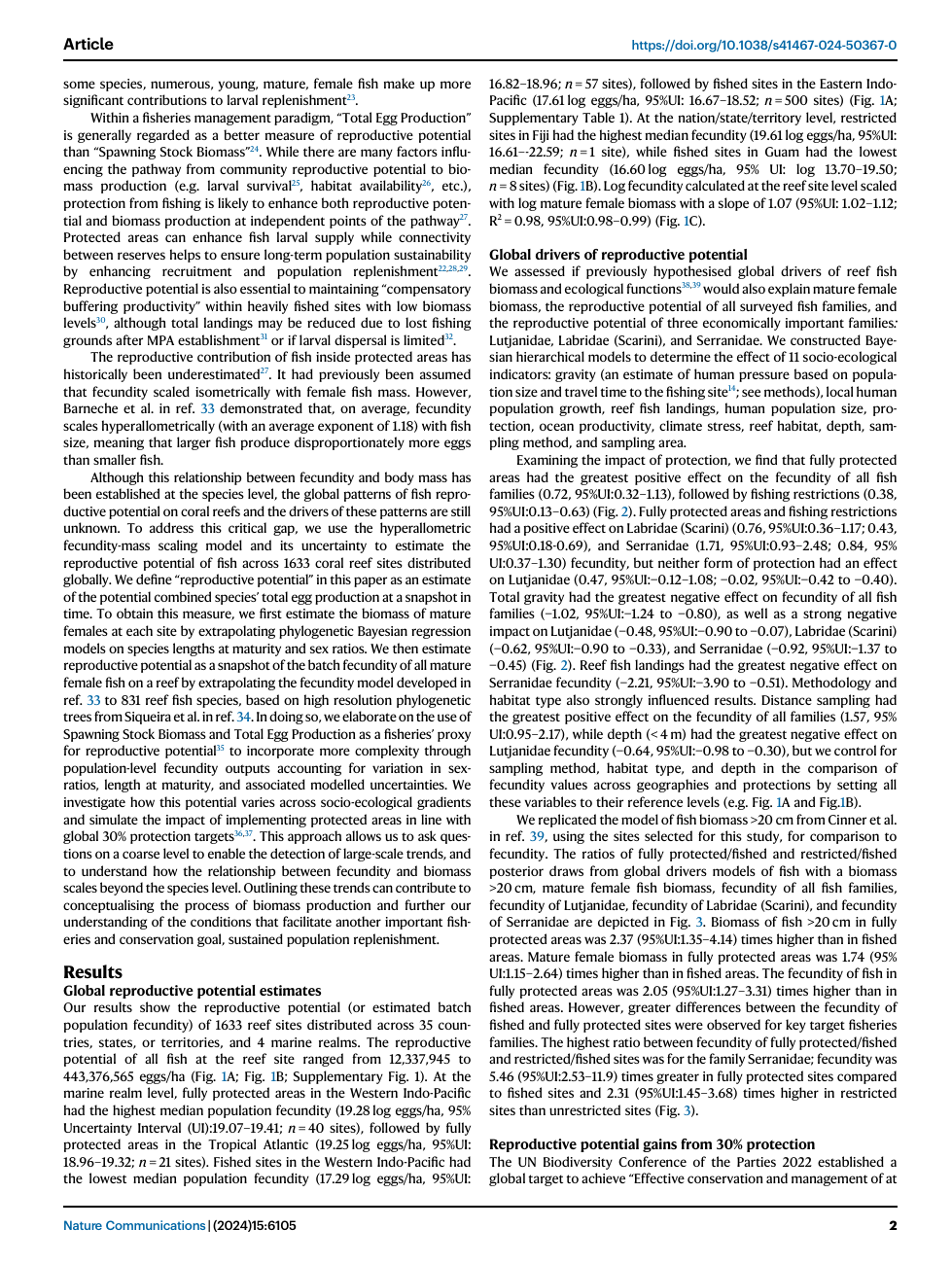
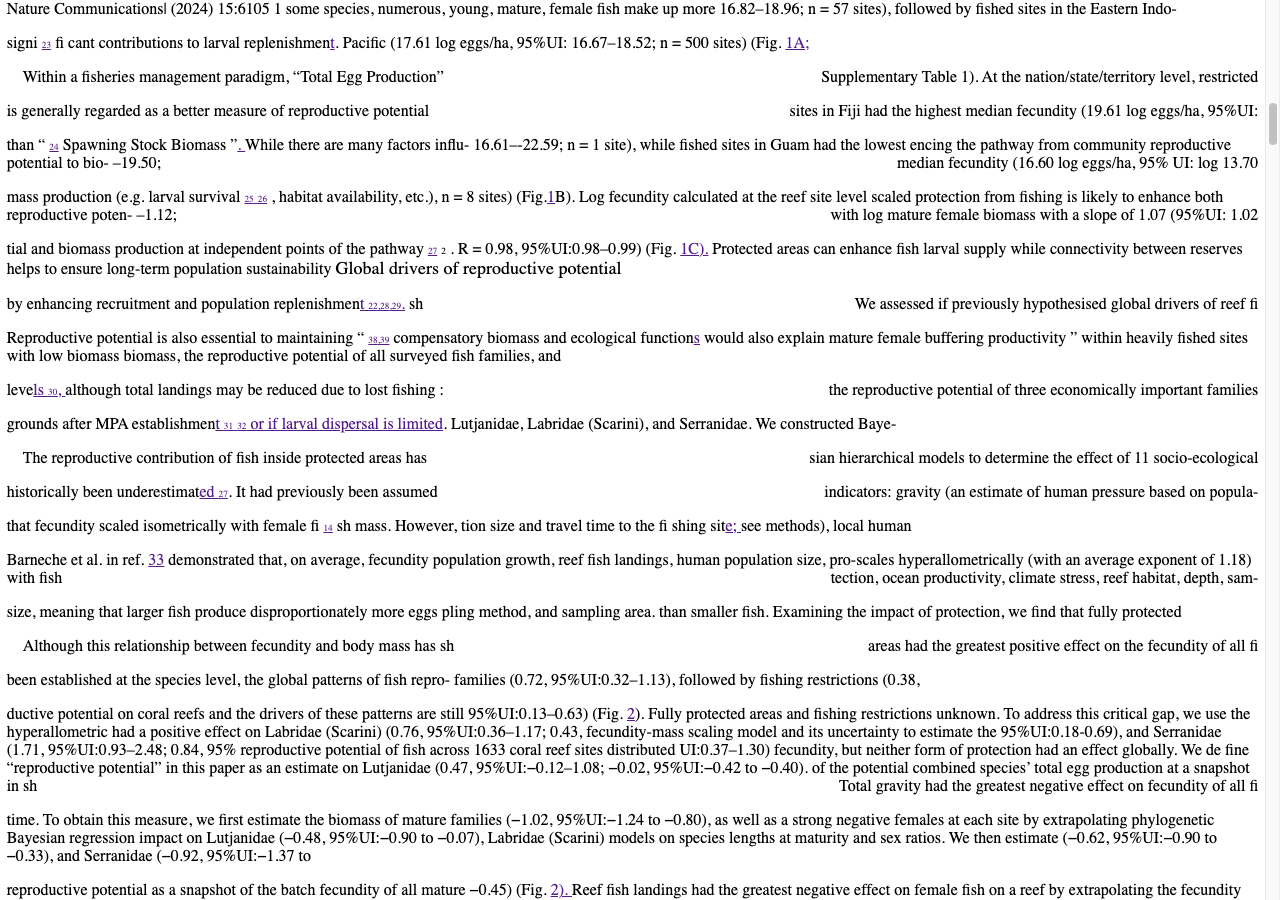
We ran Calibre 8.8.0 with the default PDF-to-EPUB command on the ten-page research excerpt. The saved EPUB interleaves the checked page-two columns. Figure 1 loses its map, density and scatter panels while text from the figure remains.
The numerical strings are present, but some appear within the wrong neighbouring passage. A successful command exit therefore does not settle reading order or figure preservation. Inspect the actual source and Calibre file in the published research-paper comparison; different sources or conversion settings may behave differently.
Published PDF
Calibre default output
If every printed line becomes a new line
Look at PDF Input and the line-unwrapping controls. Calibre uses a configurable factor to decide which lines to join. Adjusting that factor changes how aggressively lines are combined; use the built-in help and test a small change against the same passage.
Do not judge the change only by a smoother-looking paragraph. Make sure a heading has not joined the sentence beneath it, and that a short list still has separate items. A repair that joins ordinary prose can damage a recipe, poem or dialogue transcript.
Our broken-line-break guide explains the reading checks without requiring you to understand the underlying file structure.
If the columns still read in the wrong order
A larger font cannot repair an incorrect sequence. Follow the last sentence of one column into the next passage and compare it with the source. If unrelated text interrupts that sentence, the layout has been interpreted incorrectly.
Do not keep changing margins in the hope that the missing sequence will return. Consider another conversion approach using the original PDF. EPUBTurn is designed to rebuild reading order in complex pages; try a free sample and inspect the same passage. Compare actual outputs rather than assuming one converter is best for every document.
If headers or pictures interrupt the article
Check printed page transitions. A repeated publication name or page number can slip into body text, while a meaningful section heading needs to remain. Calibre offers search-and-replace controls, but broad deletion rules need careful review. Work on a copy and avoid removing every repeated word.
For pictures, check the figure, labels and caption together. A file that contains the image can still place it too far from the explanation. Keep detailed charts available in the PDF if the reading edition makes their labels difficult to inspect.
Choose the result you would actually read
Calibre can be a useful route for a straightforward document and a useful editor for an EPUB that needs work. Complex layouts may require more correction time than you want to spend.
If that happens, compare an EPUBTurn sample with your Calibre attempt. Read the same passage, enlarge the text and inspect the same figure. Choose the route that gives you a complete, comfortable reading edition with a level of checking you can manage.
Source and licence
Source: Hadj-Hammou et al. (2024), Global patterns and drivers of fish reproductive potential on coral reefs. CC BY 4.0. Pages 1–10 extracted; converted files and screenshots are adaptations.
Compare the same passage before changing tools
Keep your Calibre output and compare the identical passage with an EPUBTurn result. The reviewed paper result preserves the checked column order that Calibre’s default file interleaves; the reviewed export also discloses manual equation work. The actual NASA sample EPUB is a separate unedited sample of prose and hardware drawings. Choose the source that resembles your task rather than declaring one tool superior on every PDF.
NASA source
D. Harold Shelton, Apollo experience report: Lunar module stabilization and control system, NASA, 1975. US government work; public use permitted. Original pages 3–8 extracted; sample selects excerpt pages 4–6.
Files used in this guide
Download the source files, conversion results or worksheets referenced here. Each label identifies the source document or the converter used.
Published research-paper PDF (pages 1–10)EPUBTurn reviewed result; three equation crops correctedEPUBTurn actual NASA sample: three selected pages