Test whether images stay with their captions
An image count can miss swapped captions or unreadable labels. Compare each useful figure with its caption, referring passage and smallest information-bearing detail.
On this page
Check the figure against the original page
The published paper provides the expected figure, caption and panel relationships. Compare the converted result with that original rather than counting an image as a complete result. Figures spanning pages or sharing captions need their own source reference.
Check meaning inside the image
Keeping the correct caption does not ensure the image itself is useful. A diagram can lose fine labels during cropping or compression, and a multipanel figure can be reduced to only one panel. Record the meaningful parts you expect before reviewing the output.
For the actual research chart, axis labels and legend symbols carry information; a decorative background does not serve the same role. Inspect the figure at normal reading size and enlarged size, then judge whether the reader can complete the intended identification task. Image count, file dimensions and caption text are helpful clues, but the practical question is whether the explanation remains understandable.
Match Figure 1 to its actual caption
In the published fish-reproduction paper, Figure 1 contains three related plot panels and a caption. Match the caption to the entire figure, then inspect the legend and axis information inside each panel. The reviewed EPUBTurn copy retains the panels and caption but clips lower axis labels and ticks in two panels. That is a partial result, even though an image resource is present. The four inspected default competitor outputs retain figure-related text without the plot panels. Use the original page when interpreting a plotted relationship; a retained caption alone does not make the chart readable.
Check the words that make the figure interpretable
A chart’s caption explains the subject, but axes, units and legend symbols explain how to read the plotted marks. Identify those elements in the original before opening the converted picture. Inspect both the top and bottom edges at a useful zoom, since a crop can retain the central curves while losing a label. Match panel letters to the caption and nearby references. Record a partially retained chart separately from an entirely missing image; both need attention, but they describe different results.
Inspect retained labels as well as the caption
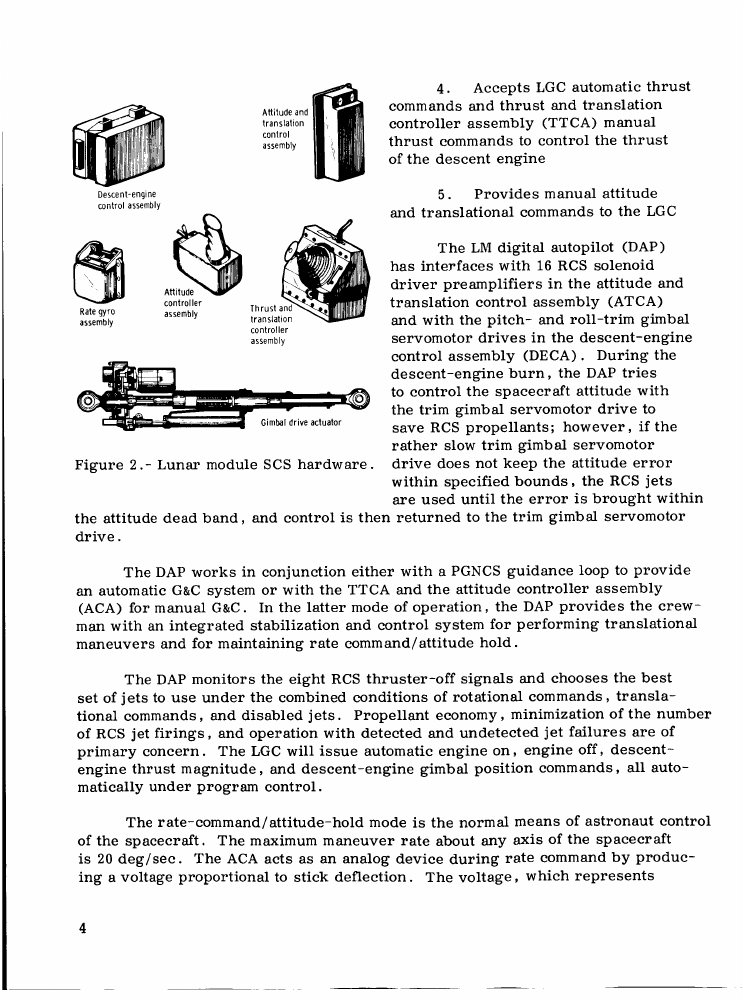
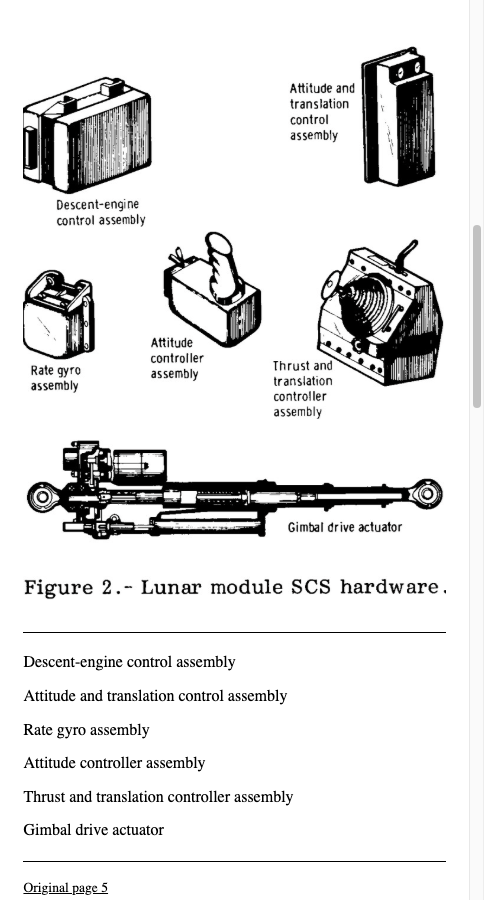
The NASA sample keeps the six hardware drawings and their labels with Figure 2’s caption. Compare the gimbal-drive actuator and its label in the original and saved copy. The picture is larger than one viewport, so scroll to inspect its lower edge rather than calling that temporary screen cutoff a missing crop. This unedited sample is a different result from the journal-paper chart with clipped lower axes. Choose a useful labelled picture in your own EPUBTurn trial.
Open the actual source PDF · Download the saved EPUBTurn sample.
For your own document, create an EPUBTurn sample from your PDF, then use the reading checks described here.
Source PDF
EPUBTurn sample
Sources and further reading
Related guides
- PDF to EPUB with images: keep the pictures that make the article useful
- Blurry EPUB images: identify where detail was lost
- How to keep EPUB diagrams readable in dark mode
- Inspect actual EPUB images: published-paper archive inventory
- Check image descriptions in converted illustrated books
- Inspect real PDF and EPUB examples: source, raw output and edits
- Build a reproducible PDF to EPUB comparison record
- Illustrated PDF to EPUB: actual diagrams, charts and reading results
- Download real PDF sources and actual EPUB conversion outputs
- Build a reading-order test for multicolumn PDFs
- Run a fair EPUB reader task: questionnaire and protocol