Inspect actual EPUB images: published-paper archive inventory
Use an exact-file image inventory to find stored pictures, then compare the actual chart, caption and reading order with the source.
On this page
Download the actual published-paper image inventory
Download the archive image inventory for the five saved published-paper EPUBs. Each row identifies the provider, exact EPUB hash, archive path, image hash, byte size and decoded dimensions where available. The inventory contains 25 image members: three in Calibre, two in Convertio, one each in PDF24 Flow and pdf2ereader, and eighteen in the reviewed EPUBTurn file. Those counts describe stored files, not complete figures or successful conversion.
Compare a resource with the real source figure
Use Figure 1 on the original paper’s page 3. It contains three plot panels with legends, labels and a caption. Open the actual downloaded EPUB, locate the figure in the reading sequence and compare its edges with the source. The reviewed EPUBTurn copy retains the panels and caption but clips bottom axis labels and ticks in two panels. A positive image count therefore cannot establish a fully usable chart. The four default competitor outputs keep related figure text without the plot panels; their remaining image members do not contradict that observation.
Inspect images without changing the book
Work on a copy of the saved EPUB. Calibre Editor’s file list and reporting tools can help you locate image resources and preview them. Match the visible image to its archive path before changing anything. An EPUB can include a cover, publisher artwork, duplicated pictures or tiny decorative resources, all of which may contribute to the count. Do not remove a picture merely because its filename is unfamiliar. Inspect its references and the nearby reading content first.
Keep captions and reading order in the inspection
Locate the sentence that refers to the figure, then the figure and its caption. Confirm that the caption describes the visible subject and that panel letters still match the caption. Read the next paragraph to check whether the picture interrupts the intended passage. A resource that exists in the archive may be shown in the wrong place, cropped by its stored image, or displayed differently by a reader. Record the actual symptom and keep the file version with your observation.
Know which files the inventory covers
This inventory covers only the five outputs made from the unchanged ten-page published-paper excerpt. It does not include old invented demonstration files or claim that a historical cookbook scan has the same image structure. The EPUBTurn file was exported after three equation crops were manually corrected; the cloud download was still blocked by stale job status. The CSV preserves that exact file’s hash so an edited version cannot silently become the same observation. Download the source and saved outputs to repeat the inspection.
Inspect an actual retained picture before counting resources
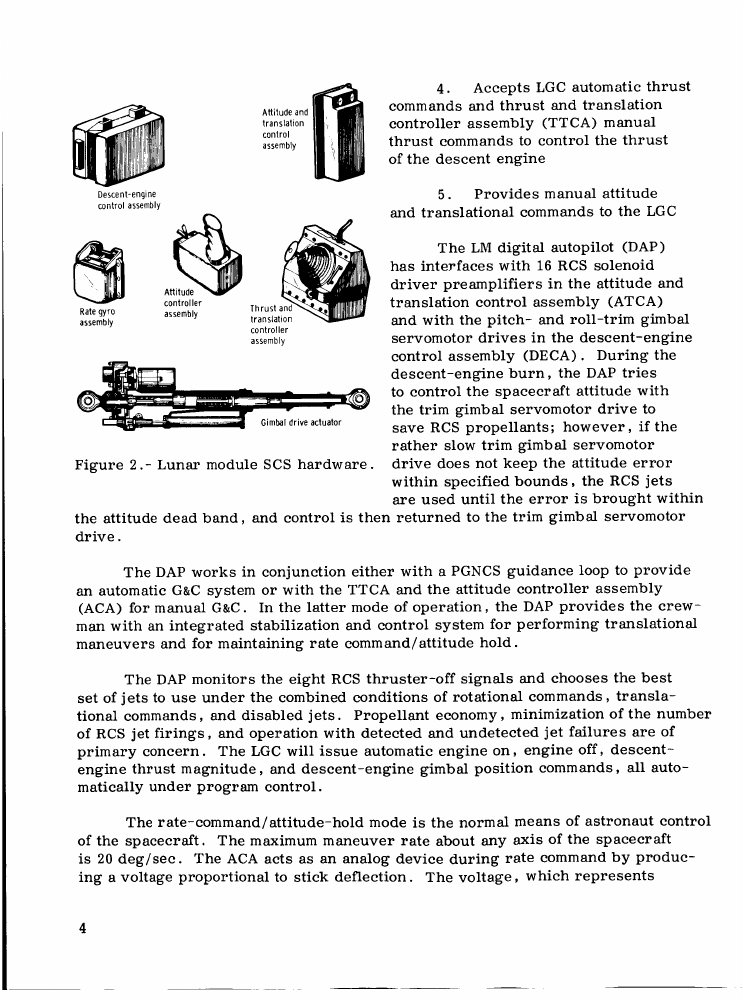
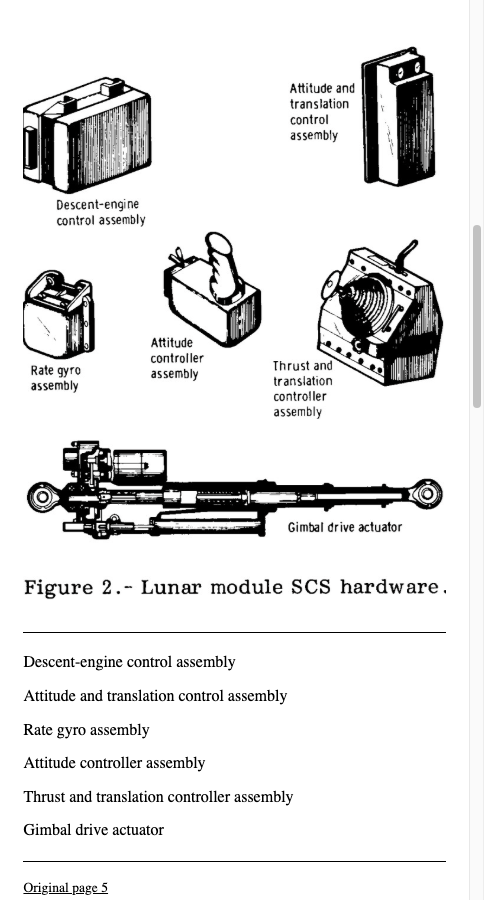
EPUBTurn provides the saved reading copy used for this check. The NASA sample contains a retained hardware picture with six labelled drawings and its Figure 2 caption. Open that actual reading copy and compare the lower actuator label with the original page. An archive count is only a starting point: it cannot establish correct labels, caption placement or the picture’s meaning. Keep the five-paper inventory separate from this NASA sample; their different sources and outputs should not silently become one image total.
Open the actual source PDF · Download the saved EPUBTurn sample.
For your own document, create an EPUBTurn sample from your PDF, then use the reading checks described here.
Source PDF
EPUBTurn sample
Files used in this guide
Download the source files, conversion results or worksheets referenced here. Each label identifies the source document or the converter used.
Five actual published-paper EPUB image inventory