Blurry EPUB images: identify where detail was lost
Compare the same feature at readable size. A crisp hero image does not establish that small chart labels or scanned footnotes remain usable.
On this page
Compare the same small feature
Choose a chart label or diagram legend and inspect it in the PDF at useful magnification. Then inspect the corresponding EPUB image. If the source is already fuzzy, the reading edition cannot be assumed to restore detail. If the source label is clear but the output is not, you have a specific observation to investigate.
Separate size from detail
An image shown small can become readable when zoomed; an image with lost detail remains blurred as it grows. Check both behaviour and actual content. A phone preview may scale an image differently from an e-reader. Record the reader used so you do not confuse a display thumbnail with the image available in the file.
A worked reading example
Zoom into the original PDF and then the EPUB image. If the source legend is already indistinct, conversion cannot be assumed to recover missing detail. If only the EPUB is blurry, record the difference.
Inspect the caption at the same time
A high-resolution figure with a tiny or missing caption can still fail the reading task. Compare the caption wording and the legend that explains the image. If the caption is EPUB text, increasing font size may help; if it is baked into the picture, it needs image detail instead.
Keep the same feature as your comparison anchor across readers and versions. A thumbnail in a library view is not the evidence to judge the image used within the chapter. After any replacement, check the figure’s aspect ratio, crop and associated passage. Document editing separately, especially when using a clearer image from an authorised source.
For a scanned chart, the source itself may contain only a limited-resolution image. Treat that as a source limitation and seek a clearer authorised edition if needed. Do not present sharpening or a generated redraw as recovered original detail. A redraw would require its own verification against the actual data.
Judge the smallest actual hardware label
The retained Figure 2 drawings in the actual NASA sample EPUB include their labels and caption. Compare a small label with the NASA report excerpt at a useful reading size. The paper’s partial figure shows why recognisable panels can still lose information at an edge. A sample helps assess the figure it includes, not recover detail absent from a blurry source.
EPUBTurn starts from the original PDF. Inspect a small legend or diagram label at a useful size.
NASA source
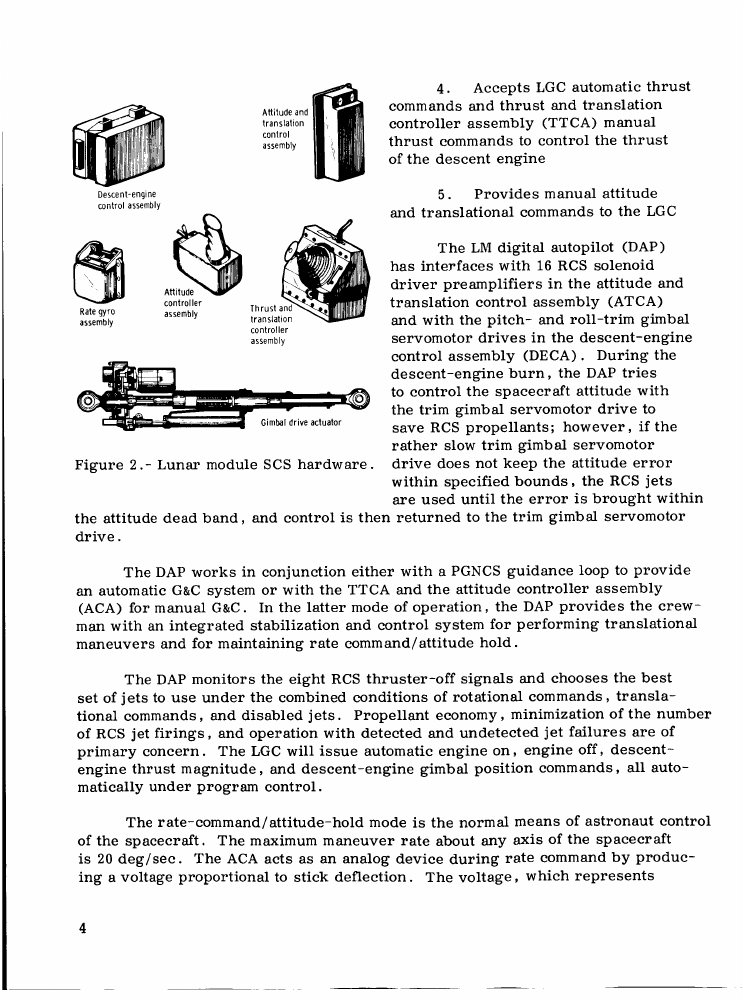
EPUBTurn sample
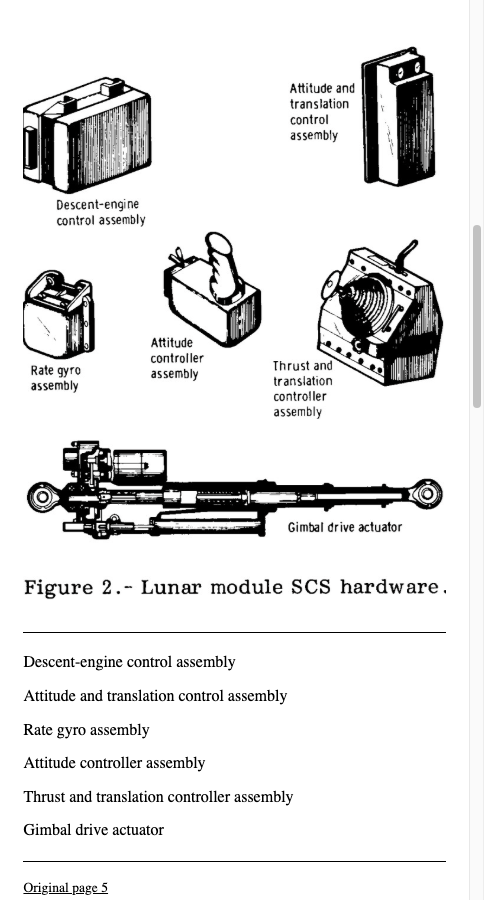
NASA source
D. Harold Shelton, Apollo experience report: Lunar module stabilization and control system, NASA, 1975. US government work; public use permitted. Original pages 3–8 extracted; sample selects excerpt pages 4–6.
Files used in this guide
Download the source files, conversion results or worksheets referenced here. Each label identifies the source document or the converter used.
NASA technical report source excerptEPUBTurn actual NASA sample: three selected pages