How to convert a thesis or dissertation into EPUB with EPUBTurn
Read a thesis chapter with adjustable text while keeping the submitted PDF for citations and close inspection of figures.
On this page
- 1. Choose a chapter you want to read, not just a smaller file
- 2. Prepare a complete chapter within the displayed limits
- 3. Upload the PDF and create the free sample
- 4. Download and read the chapter at your preferred text size
- 5. Check the chapter’s argument and references together
- A real thesis chapter: source and EPUBTurn result
- 6. Keep the useful reading copy and a route back to the source
1. Choose a chapter you want to read, not just a smaller file
A dissertation often combines a long argument, chapter references, footnotes and several kinds of figures. Turning the prose into adjustable text can make a chapter easier to read away from your desk. Keep the submitted PDF as your reference edition: its printed page numbers still matter when you cite a passage or discuss a supervisor’s comments.
Start with your own thesis or an edition whose licence permits uploading and conversion. If your university provides a native EPUB, try that edition first. Otherwise, use EPUBTurn to make a reading sample from a PDF. The goal is a comfortable reading copy, rather than a replacement for the deposited dissertation.
2. Prepare a complete chapter within the displayed limits
Check the upload screen before choosing the file. A long thesis may exceed the service’s current page limit even when its file size is small. Prepare a permitted chapter PDF outside EPUBTurn when necessary; follow the chapter preparation guide. Do not assume the upload control lets you select arbitrary pages after uploading.
Include the chapter title, its closing paragraph and any notes needed to understand the passage. Match physical PDF pages to printed chapter numbers. If a note refers to an appendix outside the excerpt, keep that appendix available in the original. Name the reading file with the author, short thesis title and chapter number so you can find the source later.
3. Upload the PDF and create the free sample
Open the PDF upload page, choose your prepared PDF, and check the displayed page count and sample information. Select Create free sample. EPUBTurn selects sample pages automatically; the sample is a way to check the conversion before deciding whether to process more of the document.
Wait for the sample conversion to finish. Check the headings and the paragraph around one footnote marker in the converted material. If the selected pages do not include the chapter transition or reference list you need to assess, the sample cannot establish those features. Decide whether a different permitted chapter excerpt would make a more useful first test.

4. Download and read the chapter at your preferred text size
When the conversion is ready, select Create sample download, then Download sample EPUB. Save the EPUB with the chapter PDF, and open the downloaded file in your reading app. The three screenshots below show those actual EPUBTurn controls; the controls are the same for different PDF types. The separate thesis example below shows the result from an actual dissertation excerpt.
Increase the reader’s text size by one step and read several paragraphs. Check that the sentence continues naturally after a heading and that a footnote has not entered the middle of the argument. For Mac readers, the Apple Books import guide explains how to open the file. A successful import alone does not establish citation accuracy.

5. Check the chapter’s argument and references together
Choose one citation with an author and year, one numbered footnote, and one internal reference such as “see Section 3.2”. Compare each with the PDF. Confirm the marker still belongs to the same sentence, the note remains understandable, and the cited author’s name has not changed. A visible note number is not necessarily a working link; try the link before relying on jump-and-return navigation.
Open a referenced diagram and read its caption. If the chapter uses equations, compare the symbols and equation numbers in the equation checking guide. Keep the PDF open for anything whose exact arrangement carries meaning. Our research-paper comparison required three manual equation-crop corrections, so that result does not promise an untouched thesis conversion.
A real thesis chapter: source and EPUBTurn result
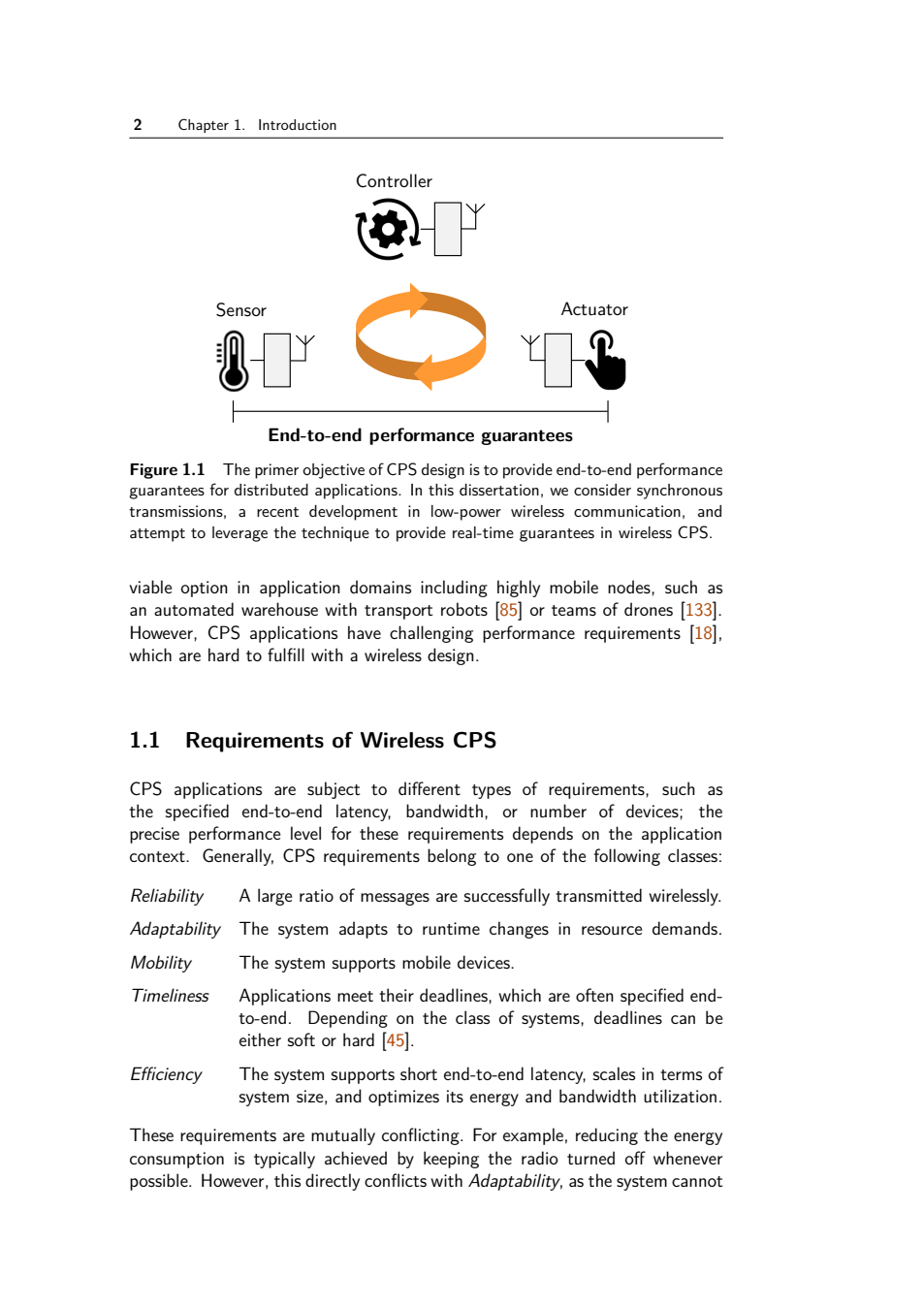
We tested three unchanged pages from Romain Jacob’s openly licensed 2020 doctoral thesis. The original dissertation contains 195 physical PDF pages; the uploaded excerpt contains original pages 17–19, the opening of Chapter 1. EPUBTurn’s automatic sample included all three excerpt pages. No text or illustration crops were corrected before download.
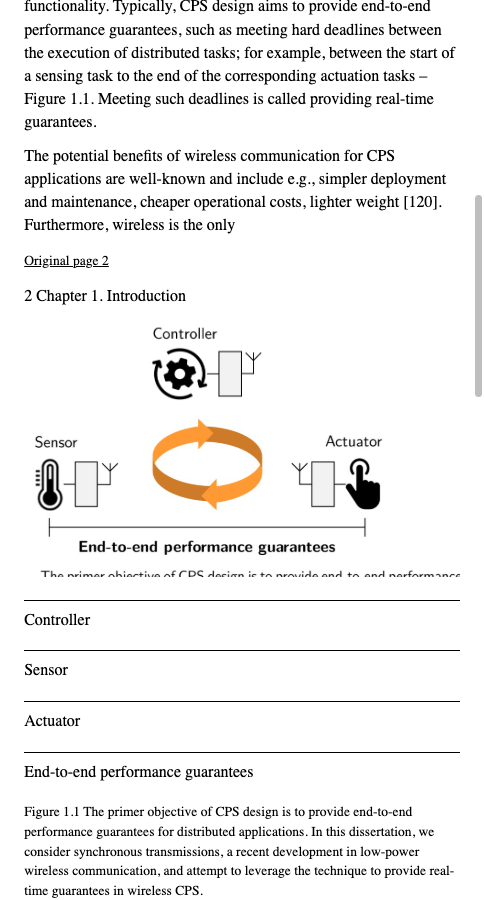
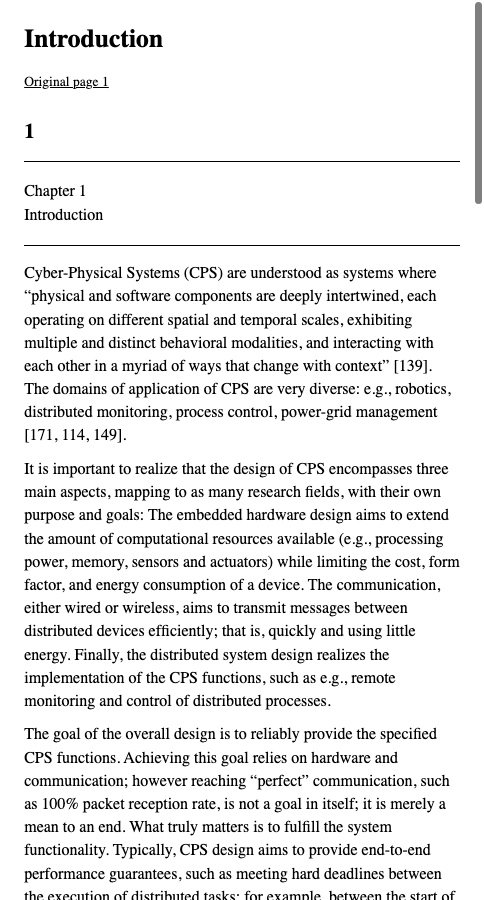
The downloaded EPUB contains an Introduction chapter, adjustable body text and Figure 1.1 with its Controller, Sensor and Actuator labels. The inspected citation markers remain beside the prose. The figure and caption can be inspected in the screenshots and downloaded files.
The result retains running page headers and printed page numbers, which interrupt paragraph continuations at both page boundaries. Figure labels appear again as separate text beneath the image. The image crop clips part of a duplicated caption at its lower edge; the complete caption is retained as separate body text. Citation markers are text; a linked full bibliography, footnote jump-and-return behavior and later chapter navigation were not established by these three pages. The file passed EPUBCheck, which checks file structure rather than scientific accuracy.
Source: Romain Jacob, 2020, Leveraging Synchronous Transmissions for the Design of Real-time Wireless Cyber-Physical Systems, ETH Zürich, author’s thesis record, CC BY 4.0. The excerpt preserves the original page contents; the EPUB is the actual unedited sample. Keep the full submitted PDF for precise references.
Original thesis PDF
EPUBTurn sample
6. Keep the useful reading copy and a route back to the source
Use the EPUB for reading the chapter’s discussion when the sample’s prose, notes and figures suit your task. Keep the original for page-specific quotation, close inspection of plots and the complete bibliography. Record which chapter and physical PDF pages you converted; an excerpt should never be mistaken for the entire dissertation.
If you continue with a larger conversion, check the selected document and any displayed charge before proceeding. Review a later chapter boundary as well as the opening pages. A strong opening sample cannot establish every appendix or reference list in a long thesis. EPUBTurn gives you a practical starting point: test the passage you need to read, then expand only when the result supports your reading task.
Files used in this guide
Download the source files, conversion results or worksheets referenced here. Each label identifies the source document or the converter used.
Original three-page thesis excerpt, PDFpages17–19 (CC BY4.0)Actual unedited EPUBTurn thesis sample, threepages